Music Box: Difference between revisions
No edit summary |
No edit summary |
||
| (One intermediate revision by the same user not shown) | |||
| Line 75: | Line 75: | ||
| shuffle || Shuffles your playlist. | | shuffle || Shuffles your playlist. | ||
|- | |- | ||
| list || Lists the songs. | | list || Lists the songs. ''list'' with words lists the songs whose titles have all of them (''list christmas''); ''list by'' with a name lists that composer's songs. | ||
|- | |- | ||
| new || Lists | | new (or what's new) || Lists the latest releases, newest first, with when each was approved or remastered: everything from the last week, and always at least the five most recent. | ||
|- | |- | ||
| buy ''song'' || Buys a premium song. | | buy ''song'' || Buys a premium song. | ||
| Line 90: | Line 90: | ||
|- | |- | ||
| sales || Your sales as a composer (see [[#Getting Paid|Getting Paid]]). | | sales || Your sales as a composer (see [[#Getting Paid|Getting Paid]]). | ||
|- | |||
| status || Your songs: waiting for review, approved, or why not; then your sales (see [[#After Review|After Review]]). ''status pending'', ''status approved'' or ''status rejected'' lists only those songs. | |||
|- | |- | ||
| submit (or add) || Publishes a song (see [[#Instructions for Composers|Instructions for Composers]]). | | submit (or add) || Publishes a song (see [[#Instructions for Composers|Instructions for Composers]]). | ||
| Line 113: | Line 115: | ||
Each approved song earns you [[Music Composition#Music Karma|Music Karma]], and so does every sale and every play. | Each approved song earns you [[Music Composition#Music Karma|Music Karma]], and so does every sale and every play. | ||
===After Review=== | |||
You're told what staff decided the next time you use a music box, any music box (walk up to it, double-click it, open its menu or speak to it): ''Your song Bombshell was approved!'', or that it wasn't approved and why. Say ''status'' to see all your songs at once: | |||
Alexa, status | |||
Each song is listed as waiting for review, approved (with the date), or not approved with the reason staff gave. Your sales follow. A long list scrolls by quickly: ''status rejected'' shows only the songs that weren't approved, with their reasons (''status pending'' and ''status approved'' work the same way). | |||
To publish a new version of an approved song, say ''remaster''. | To publish a new version of an approved song, say ''remaster''. | ||
| Line 149: | Line 158: | ||
! Say !! What it does !! Access | ! Say !! What it does !! Access | ||
|- | |- | ||
| review || | | review || Plays the next song waiting for review, then asks: Approve, Deny or Delete. Deny asks for a reason (TooLong, TooShort, Inappropriate, Duplicate or Other); Other asks for a one-line note to the composer (up to 100 characters). The composer is told at their next music box visit. || Owner | ||
|- | |- | ||
| approve ''song'' || Approves a song: it becomes available to every player. || Owner | | approve ''song'' || Approves a song: it becomes available to every player. ''approve *'' approves every song waiting for review, after you confirm (type Approve). || Owner | ||
|- | |- | ||
| deny ''song'' || Rejects a song. || Owner | | deny ''song'' || Rejects a song. ''deny *'' rejects every song waiting for review, after you confirm (type Deny). || Owner | ||
|- | |- | ||
| delete ''song'' || Removes a song from the library. || Owner | | delete ''song'' || Removes a song from the library. ''delete *'' removes every song, on Test Center only, after you confirm (type Delete). || Owner | ||
|- | |- | ||
| find ''song'' || Shows a song's serial number, owner, and name. || Owner | | find ''song'' || Shows a song's serial number, owner, and name. || Owner | ||
| Line 162: | Line 171: | ||
|- | |- | ||
| flushall || Removes every song, everywhere. || Owner, Test Center only | | flushall || Removes every song, everywhere. || Owner, Test Center only | ||
|} | |||
Players trusted with music review use their own command, which needs no music box: see [[#Reviewing Music|Reviewing Music]]. | |||
==Reviewing Music== | |||
Some players are asked to help staff review new songs. A reviewer is still an ordinary player: the '''[MusicReview''' command is the only thing that changes, and it works on every shard, wherever you are. | |||
Review keeps offensive content out of the library. It doesn't judge quality: a song that is rough but harmless should be approved. | |||
===Reviewing songs=== | |||
List the songs awaiting review, on every shard: | |||
[MusicReview list | |||
Each song has a number, with its title, composer, home shard and the date it was submitted. Take them in any order. | |||
To hear song 2: | |||
[MusicReview listen 2 | |||
A review copy goes into your backpack and starts playing; double-click it to hear it again. It disappears after 10 minutes, and it can't be added to a music box. | |||
Then decide: | |||
[MusicReview approve 2 | |||
[MusicReview deny 3 | |||
Deny asks why, as a music box does: '''TooLong''', '''TooShort''', '''Inappropriate''', '''Duplicate''' or '''Other'''. Other asks for a note to the composer (one line, up to 100 characters), and it needs one: a reason the composer can't act on is no use to them. Every denial has a reason; press Esc at either question and nothing is denied. | |||
If you know the reason already, type it: ''[MusicReview deny 3 Duplicate'', or ''[MusicReview deny 4 Other Please put your own name in Arranged by.'' (words that aren't a reason are the note, with the reason Other). | |||
===What happens next=== | |||
Your decision is recorded at once and applied by the song's home shard within 5 minutes. The composer is told the next time they use a music box, with your reason and note. Composers aren't told who reviewed their song. | |||
Numbers come from your own last ''list'', so another reviewer's list never changes yours. Until a decision is applied, the song stays on the list marked with who decided it (''approved by Galois, applies within 5 minutes''), and nobody can decide it a second time. | |||
''[MusicReview help'' lists the commands. On Test Center you can list and listen, but decisions are made on the live shards. | |||
===Review notices=== | |||
While songs await review, reviewers and staff who are online are told every 5 minutes, for every shard: | |||
[Music System] 4 songs awaiting review: Angel Island 1, Mortalis 1, Siege Perilous 2 ([MusicReview list; [MusicReview pause quiets these). | |||
Songs already decided aren't counted. To quiet the notices for an hour, say ''[MusicReview pause'' (or ''[MusicReview pause 30'' for 30 minutes, up to 24 hours); ''[MusicReview resume'' turns them back on. | |||
===For Owners=== | |||
Owners can always review. To make a player a reviewer, use their account name: the list is shared by every shard and covers all of the account's characters. | |||
{| class="wikitable" | |||
! Command !! What it does | |||
|- | |||
| [MusicReview add ''account'' || Makes the account a reviewer. | |||
|- | |||
| [MusicReview remove ''account'' || Takes the account off the list. | |||
|- | |||
| [MusicReview reviewers || Lists the reviewers. | |||
|} | |} | ||
==History== | ==History== | ||
The Music Box was designed and built by Adam Ant in 2022, inspired by his Amazon Echo: hence "Alexa". See [[Music Composition#History and Credits|History and Credits]]. | The Music Box was designed and built by Adam Ant in 2022, inspired by his Amazon Echo: hence "Alexa". See [[Music Composition#History and Credits|History and Credits]]. | ||
Latest revision as of 08:47, 10 November 2026

The Music Box plays music in your home on voice command. It holds the shard's library of player compositions: free songs, songs you have bought, and your own. Composers publish their songs to it and are paid when players buy them.
General Usage
Buy a music box from any Bard NPC, lock it down in your home, and double-click it. It plays your whole playlist from start to finish, then stops. Double-click it again to stop it sooner.
Give your music box a name: single-click it and choose the rename option. You then speak to it by name, as you would to a smart speaker (its designer named his "Alexa"):
Alexa, play Douce Dame Jolie
Alexa, next
Alexa, previous
Alexa, repeat
Alexa, shuffle
Alexa, loop
You never need a song's whole name: a few words of it are enough, and the music box works out which song you mean, using Angel Island's Intelligent Dialogue System. Alexa, help lists every command.
To see what music is available, say list:
Alexa, list
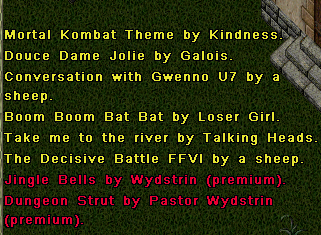
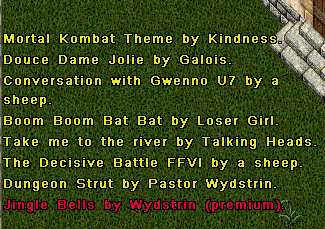
Yellow titles are yours to play: free songs, songs you have bought, and songs you composed. Red titles are premium songs, which cost gold.
To hear a premium song before buying it, ask the music box to play it:
Alexa, play strut
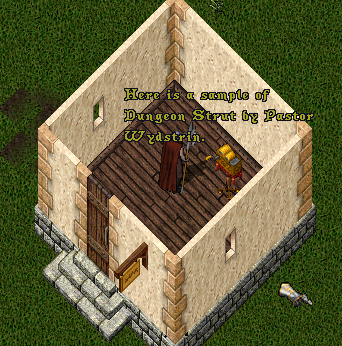
It plays a 10-second sample. To buy the song:
Alexa, buy strut
The music box walks you through the purchase:
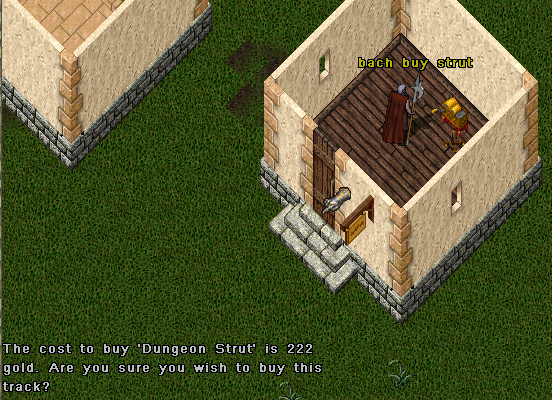
When you agree, the price is taken from your bank (or your shared bank accounts) and paid into the composer's bank, here Pastor Wydstrin's. In this screenshot the player has named the music box Bach, and asked for the song by part of its name.
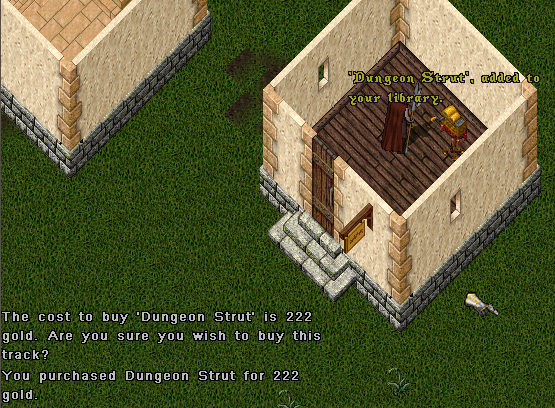
The song is now in your library and your playlist, ready to play:
- Your library is every song you have access to.
- Your playlist is the songs from your library that the music box plays. You might take the Christmas songs out of it in July. Remove takes a song out; add puts it back.
List of Commands
Say the music box's name, then the command. Several commands have a second word that does the same thing.
| Say | What it does |
|---|---|
| play song | Plays a song from your library, or a 10-second sample of one you don't own. |
| stop (or cancel) | Stops playing. |
| pause | Pauses. |
| resume (or continue) | Resumes after a pause. |
| what (or who) | Says the song and its composer. |
| next, previous | The next or previous song in your playlist. |
| repeat | Plays the last song again. |
| loop | Plays your playlist over and over. |
| shuffle | Shuffles your playlist. |
| list | Lists the songs. list with words lists the songs whose titles have all of them (list christmas); list by with a name lists that composer's songs. |
| new (or what's new) | Lists the latest releases, newest first, with when each was approved or remastered: everything from the last week, and always at least the five most recent. |
| buy song | Buys a premium song. |
| remove song (or ignore) | Takes a song out of your playlist. |
| add song | Puts a removed song back. add alone is the same as submit. |
| refresh | Adds new free songs to your library. This also happens on its own. |
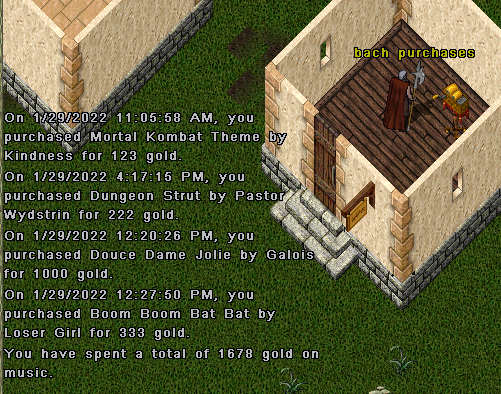
| purchases | The songs you have bought. |
| sales | Your sales as a composer (see Getting Paid). |
| status | Your songs: waiting for review, approved, or why not; then your sales (see After Review). status pending, status approved or status rejected lists only those songs. |
| submit (or add) | Publishes a song (see Instructions for Composers). |
| remaster | Asks to replace one of your approved songs with a new version. |
| rename | Renames the music box. |
| help | Lists the commands. |
Instructions for Composers
The Music Box is how composers share and sell their work across the shard.
- Write your song in a composition book and transcribe it into Sheet Music. Set its name and price at the top of the composition with # Song: and # Price: (a price of 0 makes it free). See Settings for every setting.
- Single-click your music box and choose Add, or say submit (or just add). Target your sheet music.
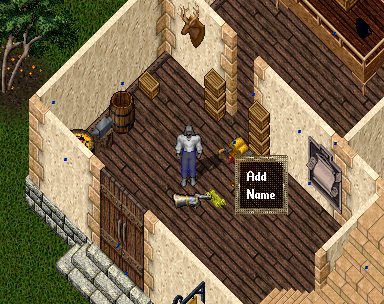
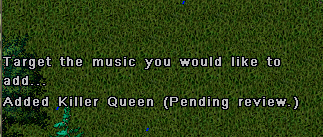
Your song is now in the shard-wide library, not just your own music box, and goes into a review queue. Staff review songs to keep out offensive content, not to judge their quality (songs can have lyrics). While it waits, you can still play it on your own music box: it is in your playlist, and the box says it is pending approval. Once approved, it appears for every player: free songs in their libraries, premium songs as red titles they can sample and buy.
Each approved song earns you Music Karma, and so does every sale and every play.
After Review
You're told what staff decided the next time you use a music box, any music box (walk up to it, double-click it, open its menu or speak to it): Your song Bombshell was approved!, or that it wasn't approved and why. Say status to see all your songs at once:
Alexa, status
Each song is listed as waiting for review, approved (with the date), or not approved with the reason staff gave. Your sales follow. A long list scrolls by quickly: status rejected shows only the songs that weren't approved, with their reasons (status pending and status approved work the same way).
To publish a new version of an approved song, say remaster.
The library is permanent and not tied to your account: once a song is in, it stays available to other players. If the character who composed a song is deleted, the song becomes free.
Napster Tracks
A song transcribed with # Napster: True is passed hand to hand instead of sold. Anyone who has a copy of its sheet music can add it to their own music box, which gives them the song (the sheet is used up). Other players hear only a sample, and are told to get a copy from the composer.
Getting Paid
When a player buys your song, the price goes straight into your bank. Say sales to see your totals:
Alexa, sales
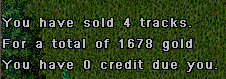
If your bank box can't take the gold, the sale is recorded as a credit to you instead, shown in your sales. Credits are paid the next time you use a music box, any music box: walk up to it, double-click it, open its menu or speak to it. The gold goes into your bank, and you're told how much. If your bank box is still full, you're told the gold is waiting: make room, then visit a music box again.
Credits are paid only to the character who earned them, on the shard where they were earned. If that character is deleted, or the music library moves to another shard, the credit is not paid.
Say purchases to see the songs you have bought:
Alexa, purchases
Leaderboard
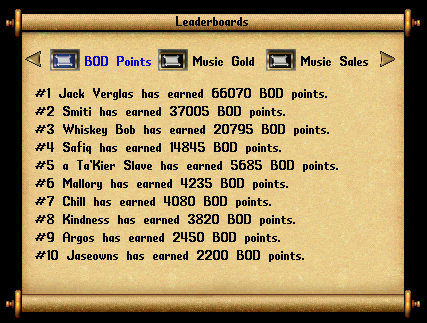
The Music Box records each composer's sales and the gold they have earned. The leaderboard at your local bank shows them.
Staff Reference
Staff use these commands to run the library. Players can't use them.
| Say | What it does | Access |
|---|---|---|
| review | Plays the next song waiting for review, then asks: Approve, Deny or Delete. Deny asks for a reason (TooLong, TooShort, Inappropriate, Duplicate or Other); Other asks for a one-line note to the composer (up to 100 characters). The composer is told at their next music box visit. | Owner |
| approve song | Approves a song: it becomes available to every player. approve * approves every song waiting for review, after you confirm (type Approve). | Owner |
| deny song | Rejects a song. deny * rejects every song waiting for review, after you confirm (type Deny). | Owner |
| delete song | Removes a song from the library. delete * removes every song, on Test Center only, after you confirm (type Delete). | Owner |
| find song | Shows a song's serial number, owner, and name. | Owner |
| dupe song | Puts a copy of a song's sheet music in your backpack. | Seer |
| flushall | Removes every song, everywhere. | Owner, Test Center only |
Players trusted with music review use their own command, which needs no music box: see Reviewing Music.
Reviewing Music
Some players are asked to help staff review new songs. A reviewer is still an ordinary player: the [MusicReview command is the only thing that changes, and it works on every shard, wherever you are.
Review keeps offensive content out of the library. It doesn't judge quality: a song that is rough but harmless should be approved.
Reviewing songs
List the songs awaiting review, on every shard:
[MusicReview list
Each song has a number, with its title, composer, home shard and the date it was submitted. Take them in any order.
To hear song 2:
[MusicReview listen 2
A review copy goes into your backpack and starts playing; double-click it to hear it again. It disappears after 10 minutes, and it can't be added to a music box.
Then decide:
[MusicReview approve 2
[MusicReview deny 3
Deny asks why, as a music box does: TooLong, TooShort, Inappropriate, Duplicate or Other. Other asks for a note to the composer (one line, up to 100 characters), and it needs one: a reason the composer can't act on is no use to them. Every denial has a reason; press Esc at either question and nothing is denied.
If you know the reason already, type it: [MusicReview deny 3 Duplicate, or [MusicReview deny 4 Other Please put your own name in Arranged by. (words that aren't a reason are the note, with the reason Other).
What happens next
Your decision is recorded at once and applied by the song's home shard within 5 minutes. The composer is told the next time they use a music box, with your reason and note. Composers aren't told who reviewed their song.
Numbers come from your own last list, so another reviewer's list never changes yours. Until a decision is applied, the song stays on the list marked with who decided it (approved by Galois, applies within 5 minutes), and nobody can decide it a second time.
[MusicReview help lists the commands. On Test Center you can list and listen, but decisions are made on the live shards.
Review notices
While songs await review, reviewers and staff who are online are told every 5 minutes, for every shard:
[Music System] 4 songs awaiting review: Angel Island 1, Mortalis 1, Siege Perilous 2 ([MusicReview list; [MusicReview pause quiets these).
Songs already decided aren't counted. To quiet the notices for an hour, say [MusicReview pause (or [MusicReview pause 30 for 30 minutes, up to 24 hours); [MusicReview resume turns them back on.
For Owners
Owners can always review. To make a player a reviewer, use their account name: the list is shared by every shard and covers all of the account's characters.
| Command | What it does |
|---|---|
| [MusicReview add account | Makes the account a reviewer. |
| [MusicReview remove account | Takes the account off the list. |
| [MusicReview reviewers | Lists the reviewers. |
History
The Music Box was designed and built by Adam Ant in 2022, inspired by his Amazon Echo: hence "Alexa". See History and Credits.