Flag Stone: Difference between revisions
Jump to navigation
Jump to search
EvilManfred (talk | contribs) No edit summary |
EvilManfred (talk | contribs) No edit summary |
||
| Line 1: | Line 1: | ||
<div id=swordborder style=" | |||
left:-243px; | |||
top:10px;"> | |||
[[File:wikisidebarart.png|link=]] | |||
</div> | |||
<div id=swordborder style=" | |||
left:-178px; | |||
top: -172px;"> | |||
[[File:wikitop4.png|link=]] | |||
</div> | |||
<div id=cf style=" | |||
left:-192px; | |||
top: -122px;"> | |||
[[File:tchestbase2.gif|class=bottom|link=Main_Page]] | |||
</div> | |||
<div id=cf style=" | |||
left:-58px; | |||
top: -109px;"> | |||
[[File:lit01.gif|class=bottom|link=Main_Page]] | |||
</div> | |||
<div id=cf style=" | |||
left:-145px; | |||
top: -98px;"> | |||
[[File:lit02.gif|class=bottom|link=Main_Page]] | |||
</div> | |||
<div id=cf style=" | |||
left:-70px; | |||
top: -123px;"> | |||
[[File:lit04.gif|class=bottom|link=Main_Page]] | |||
</div> | |||
<div id=cf style=" | |||
left:-161px; | |||
top: -109px;"> | |||
[[File:lit06.gif|class=bottom|link=Main_Page]] | |||
</div> | |||
<div id=cf style=" | |||
left:-127px; | |||
top: -83px;"> | |||
[[File:64.png|class=bottom|link=Main_Page]] | |||
</div> | |||
<div id=cf style=" | |||
left:-192px; | |||
top: -121px;"> | |||
[[File:tchestlid2.gif|class=top|link=Main_Page]] | |||
</div> | |||
<div id=cf style=" | |||
left:-114px; | |||
top: -135px;"> | |||
[[File:wikilogo5.png|class=bottom|link=Main_Page]] | |||
</div> | |||
<div id=cf style=" | |||
left:-182px; | |||
top: -165px;"> | |||
[[File:aispwiki.png|class=bottom|link=Main_Page]] | |||
</div> | |||
<div id=menubutton style=" | |||
left:-140px; | |||
top: 400px;"> | |||
[[File:mainmenu02.png|class=bottom|link=Main_Page]] | |||
[[File:mainmenu01.png|class=top|link=Main_Page]] | |||
</div> | |||
<div id=menubutton style=" | |||
left:-110px; | |||
top: 383px;"> | |||
[[File:totoparrow2.png|class=bottom|link=#top|Back to Top]] | |||
[[File:totoparrow1.png|class=top|link=#top|Back to Top]] | |||
</div> | |||
<div id=menubutton style=" | |||
left:-110px; | |||
top: 450px;"> | |||
[[File:tobotarrow2.png|class=bottom|link=#footer|Bottom of Page]] | |||
[[File:tobotarrow1.png|class=top|link=#footer|Bottom of Page]] | |||
</div> | |||
{{#css: | |||
#p-logo { display:none; } | |||
#cf { | |||
position:absolute; | |||
margin:0 auto; | |||
width:238px; | |||
} | |||
#swordborder { | |||
position:absolute; | |||
margin:0 auto; | |||
width:1350px; | |||
} | |||
#menubutton { | |||
position:absolute; | |||
margin:0 auto; | |||
width:200px; | |||
} | |||
#cf img { | |||
position:absolute; | |||
left:0; | |||
-webkit-transition: opacity 0,2s ease-in-out; | |||
-moz-transition: opacity 0,2s ease-in-out; | |||
-o-transition: opacity 0,2s ease-in-out; | |||
transition: opacity 0,2s ease-in-out; | |||
} | |||
#swordborder img { | |||
position:absolute; | |||
left:0; | |||
-webkit-transition: opacity 0,2s ease-in-out; | |||
-moz-transition: opacity 0,2s ease-in-out; | |||
-o-transition: opacity 0,2s ease-in-out; | |||
transition: opacity 0,2s ease-in-out; | |||
} | |||
#menubutton img { | |||
position:fixed; | |||
left:1; | |||
bottom:1; | |||
-webkit-transition: opacity 0,2s ease-in-out; | |||
-moz-transition: opacity 0,2s ease-in-out; | |||
-o-transition: opacity 0,2s ease-in-out; | |||
transition: opacity 0,2s ease-in-out; | |||
} | |||
#cf img.top:hover { | |||
opacity:0; | |||
} | |||
#menubutton img.top:hover { | |||
opacity:0; | |||
} | |||
} | |||
}} | |||
</div> | |||
https://game-master.net/images/wiki/Flag%20Stone.png | https://game-master.net/images/wiki/Flag%20Stone.png | ||
Revision as of 20:43, 19 February 2023


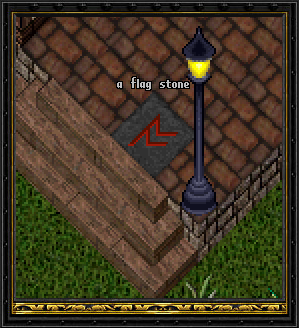
Flag Stones are a simple way for players to flag themselves grey for open combat. These are primarily used for Player Run Tournaments
Purchased from the provisioner, these are deed items are placed within your humble home. Simply double click the flag stone and click OK on the prompt.
Note* You will be flagged as a criminal, and may have to deal with the town guards should you enter a guarded region.
See Also: Tournament Stone